
 EN
EN
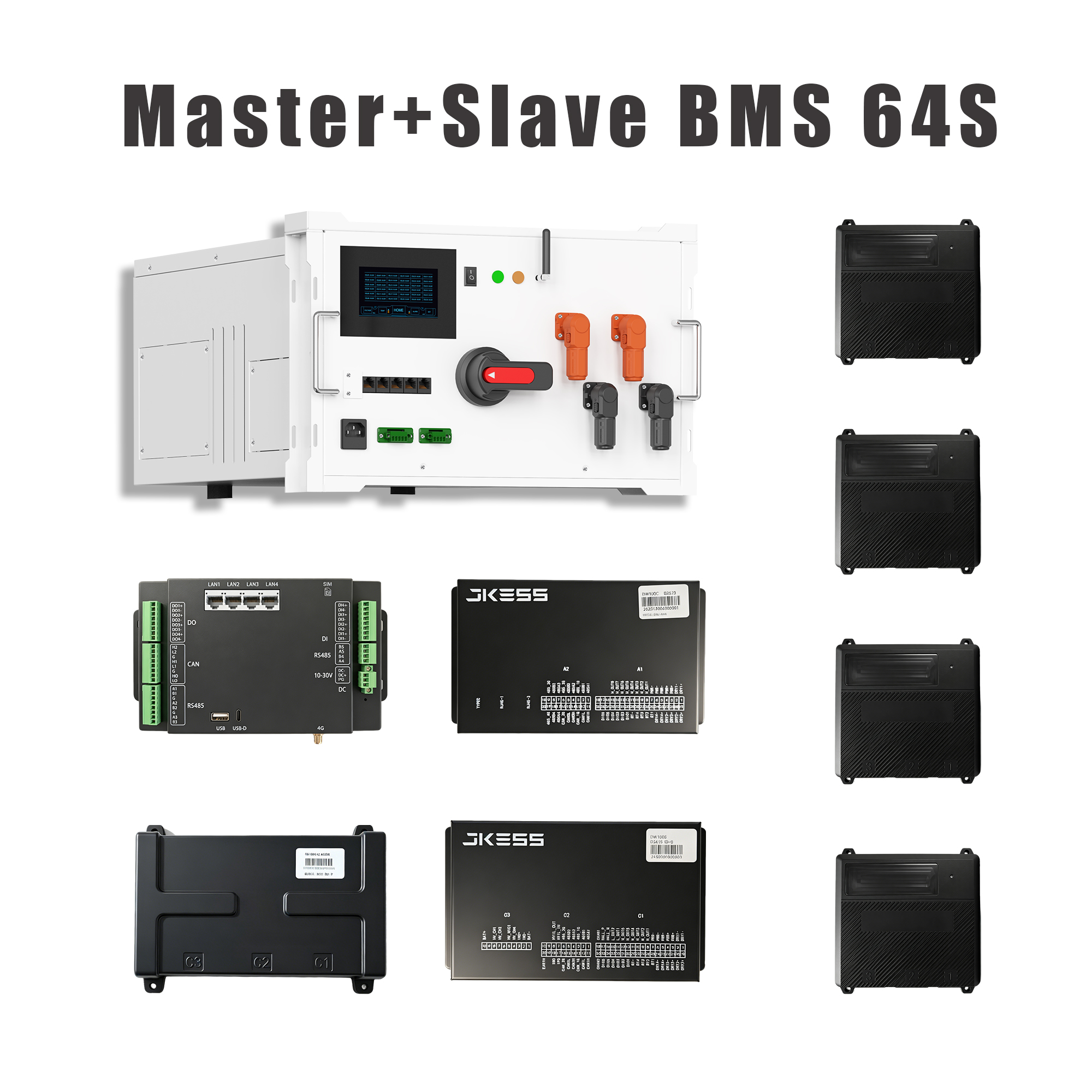
 הזהרה
הזהרה
עבודה במתח גבוה מסוכנת. יש תמיד לפעול בהתאם לחוקים והתקנות המקומיים הנוגעים לעבודה במתח גבוה. אם אינכם בטוחים לגבי התקנות במדינתכם, יש לפנות לאלקטרונאי מורשה לקבלת מידע נוסף.

מדריך המשתמש זמין כאן: חנות Alibaba שליחת בקשה
שאלות נפוצות לקנייה ראשונה:
אם התמודדתם בעבר במערכת אחסון אנרגיה במתח גבוה רק לעיתים רחוקות, השאלות הנפוצות הבאות יעזרו לכם מאוד.
1. מהו BMS? לאיזה מטרה משמש?
BMS הוא ראשי תיבות של Battery Management System (מערכת ניהול סוללות), אשר מהווה את ה"מוח" של הסוללה. היא אחראית להגנה על הסוללה, מעקב אחר המתח וטמפרטורה, מניעת טעינה יתר ופריקה יתר, והארכה של חיי הסוללה.
2. מה כולל ה-BMS שנמכר?
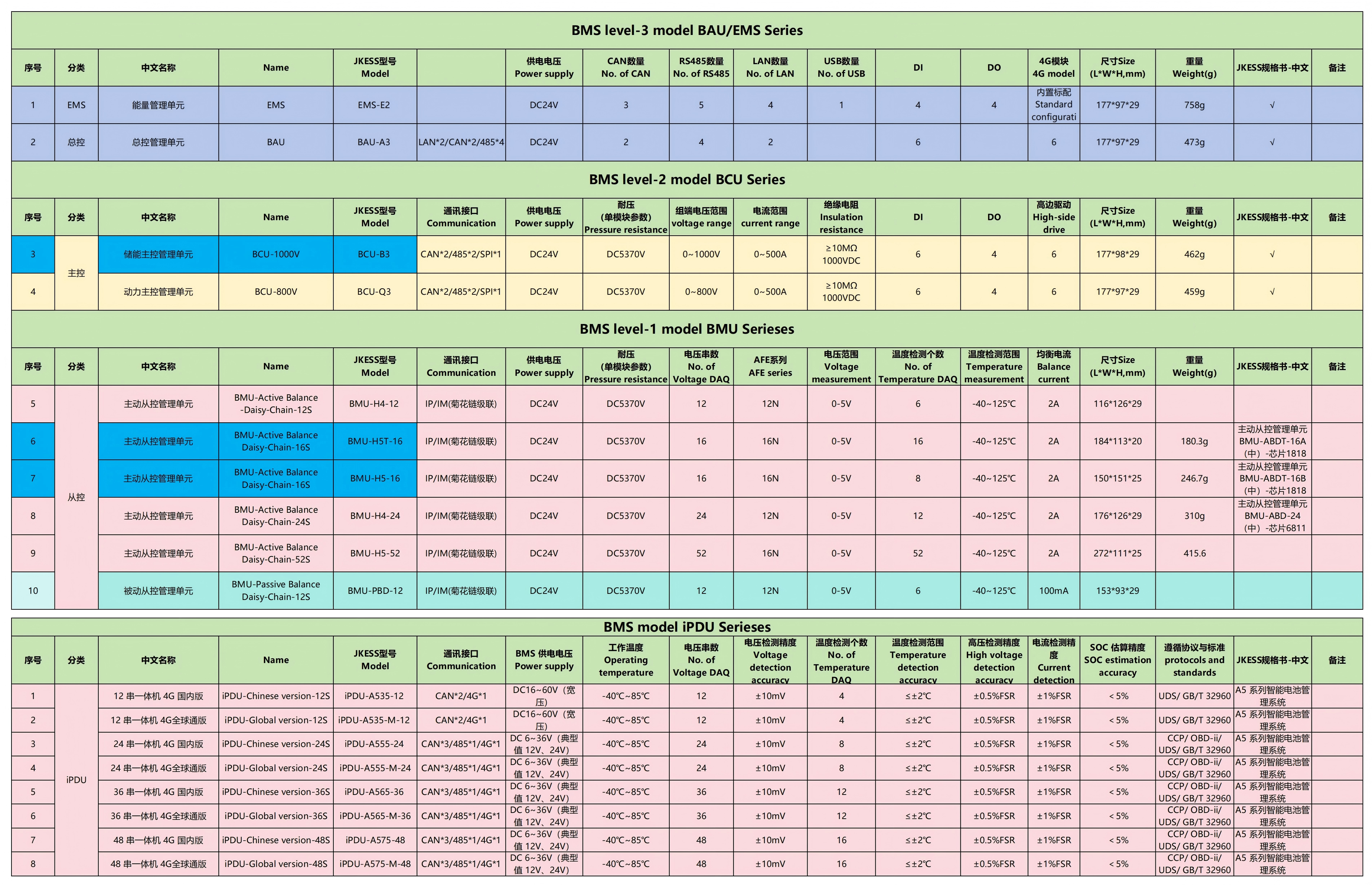
אנו מציעים פתרונות מלאים לאחסון אנרגיה: קיטים קטנים ל-BMS במתח גבוה; ארונות לאחסון אנרגיה לתעשייה ולמסחר, כולל BMS וקיטים; קופסאות במתח גבוה; בקרים ראשיים ומשניים;arnesses לאיסוף נתונים, harnesses לתקשורת, harnesses לספק כוח; مجשים לבקרת טמפרטורה, חיבורים, פיוזים ואבזרים נוספים.
3. מה ההבדלים בין קיטים קטנים למתח גבוה לבין BMS לאחסון אנרגיה לתעשייה ולמסחר?
קיטים קטנים למתח גבוה: גודל קטן, התקנה קלה, מתאימים לדיור פרטי, להתקנים קטנים ולאחסון אנרגיה קטן.
מערכת ניהול סוללות לאחסון אנרגיה מסחרי ותעשייתי: הספק גבוה יותר ובטוחה יותר, מתאימה למפעלים, ארונות אחסון אנרגיה גדולים ותחנות כח.
4. מהן הפונקציות של בקר הראשי והבקר המשני?
בקר ראשי: הבקר המרכזי, האחראי לבקרה כללית, הגנה וחיבור למחשב/למערכת האחורית.
בקר משני: אחראי לאיסוף מתח וטמפרטורה של כל תא סוללה וביצוע איזון.
5. מהו ייעוד תיבת המתח הגבוה? האם היא אופציונלית?
תיבת המתח הגבוה אחראית על מפסק הבטיחות של מתח הסוללה הגבוה והיא חיונית. ללא תיבה זו קיים סיכון לזרם חשמלי, להצתה ולנזק לציוד.
6. מהו טעינה מקדימה? מדוע היא הכרחית?
הטעינה המקדימה פועלת ככפתור בטיחותי לפני ההפעלה, ומונעת נזק לציוד עקב זרמים חזקים פתאומיים. ללא טעינה מקדימה, הסיכוי לשריפת הקונטקטורים עולה, מה שגורם להפעלת מנגנוני הגנה.
7. מהו קבוצת חוטים (Wiring Harness)? למה לקנות את הקבוצה כולה?
קבוצת החוטים מחברת בין מערכת ניהול הסוללות (BMS) לסוללה, והיא חיונית לאיסוף נתוני מתח וטמפרטורה ולתקשורת. קבוצות חוטים שאינן תואמות עלולות לגרום לנתונים לא מדויקים ולתקלות במערכות הגנה.
8. מהי המטרה של חומרת מדידת הטמפרטורה (NTC)?
לנטר את טמפרטורת הסוללה כדי למנוע חימום יתר או קירור יתר, ובכך להימנע מהתלקחות, נזק וירידה מהירה באורך חיים של הסוללה.
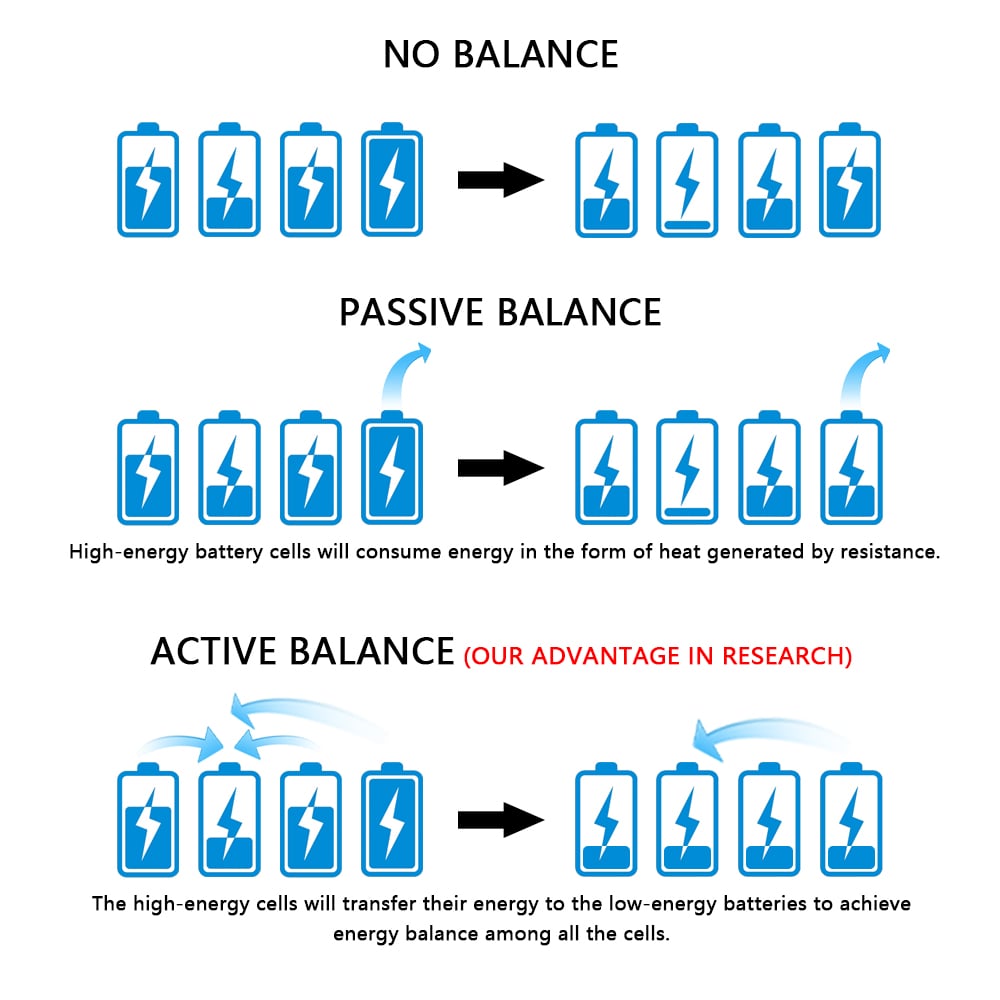
9. מהי איזון סוללות? מדוע הוא חשוב?
האיזון מבטיח שהמתח בכל תא סוללה נשאר עקבי, ומונע מאף תא אחד להיטען יתר על המידה או להתפרק יתר על המידה, ובכך משפר את אורך החיים הכולל של חבילת הסוללות ואת הקיבולת שלה.
10. מהי דיוק האחוז של SOC (מצב הטעינה)?
המערכת קליברובה במפעל, ותהייה מדויקת יותר לאחר מחזור טעינה ופריקה מלא.
11. אילו מצבים מסוכנים מגינה המערכת (BMS) עליהם?
1. מתח גבוה מדי, מתח נמוך מדי
2. חוסר התאמה של זרם, קצר
3. חום יתר, חום נמוך מדי
4. כשל בהטענה מקדימה
5. מעגל מתח גבוה נותק
6. תקלה בתקשורת
12. האם ניתן לייצא את מערכת ניהול הסוללות (BMS) הזו לדרום מזרח אסיה ולאירופה?
כן, המוצרים שלנו תואמים את סטנדרטי הייצוא, אנו מספקים את כל המסמכים התומכים, ותומכים באבחון תקלות מרחוק בשפה האנגלית.
13. אני לא מבין טכנולוגיה – האם תוכלו לעזור לי באבחון תקלות?
כן, אנו מספקים אבחון תקלות מרחוק מלא, הנחיות לחיבורים, הגדרת פרמטרים ופתרון תקלות.
14. האם יש לחבר את מערכת ניהול הסוללות (BMS) למחשב?
התקנה ראשונית, הגדרת פרמטרים ופתרון תקלות דורשים חיבור למחשב; לאחר שהמערכת פועלת באופן תקין, היא יכולה לפעול באופן עצמאי ללא מחשב.
15. האם מערכת ניהול הסוללות (BMS) הזו תהיה תואמת לסוללה שלי?
אנו תומכים בסוללות ליתיום סטנדרטיות. פשוט ספרו לי את מספר התאים של הסוללה והקיבולת שלה, ואנו נבחר את המודל המתאים ונגבה אותו מרחוק.
מהדורה מתקדמת של שאלות נפוצות על ידע בסיסי במוצרים לחץ גבוה:
לאחר שעוברים את נקודות הידע לעיל, הגעתם לרמה של מתחילים. בהמשך נלמד את נקודות המפתח של כל מערכת הלחץ הגבוה.
מערכת BMS
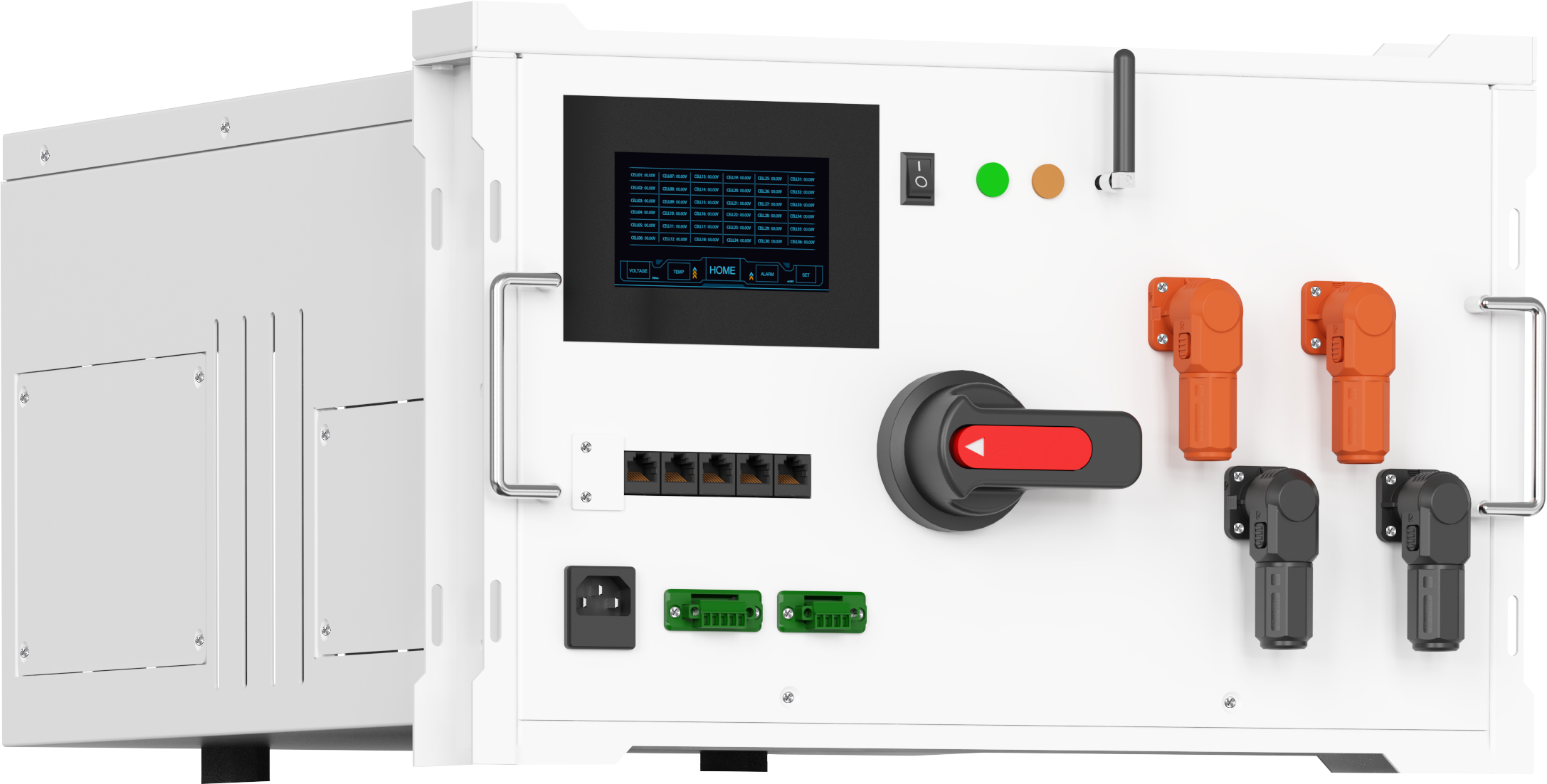
1. מהי מערכת ניהול הסוללות (BMS) ומהי הפונקציה המרכזית שלה?
מערכת ניהול הסוללות (BMS) היא יחידת הבקרה המרכזית של מערכת ניהול הסוללות. היא אחראית על ניטור מתח הסוללה, הזרם, הטמפרטורה ורמת הטעינה (SOC) והבריאות (SOH), על ביצוע איזון, הגנה מפני מתח גבוה מדי/נמוך מדי, זרם גבוה מדי, טמפרטורה גבוהה מדי/נמוכה מדי, תקשורת חיצונית וקישור למערכות אחרות, ועל קביעת הבטיחות, האמינות ותקופת החיים של כל מערכת אגירת האנרגיה.
2. האם המוצר תומך בפרמטרים מותאמים אישית?
תומך בהתאמה מרחוק: נקודות הגנה, זרם איזון, אסטרטגיות טעינה/פריקה, פרוטוקולי תקשורת, קליברציה של SOC, תצורת יציאות, וכו'.
3. האם למוצר יש תכונות הגנה?
כל המערכת מצוידת במספר רב של מנגנוני הגנה, כולל הגנה מפני מתח גבוה מדי, מתח נמוך מדי, זרם גבוה מדי, טמפרטורה גבוהה מדי, טמפרטורה נמוכה מדי, קצר, איזון, טעינה מקדימה ומנגנון נעילה של מתח גבוה.
ערכת מתח גבוה קטנה
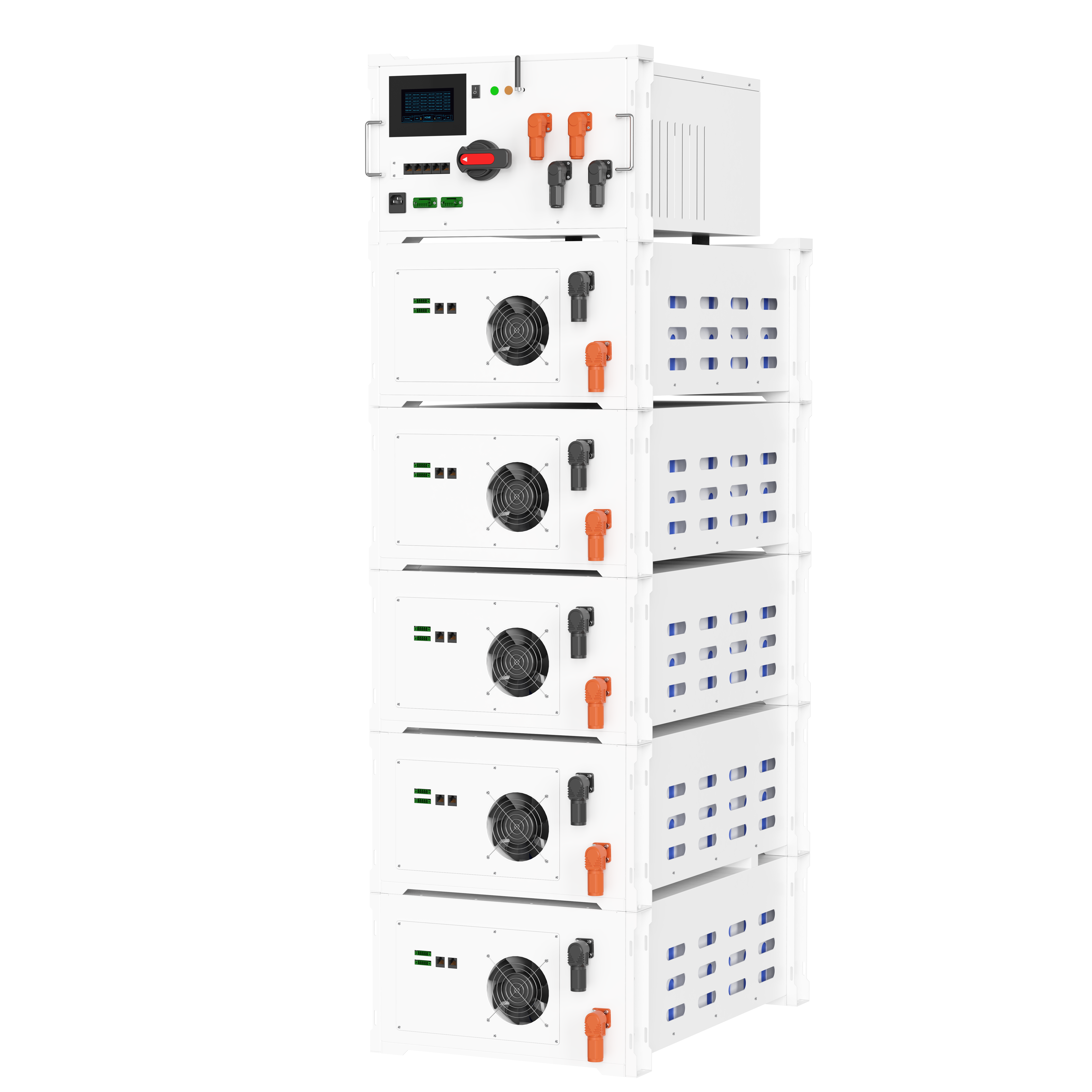
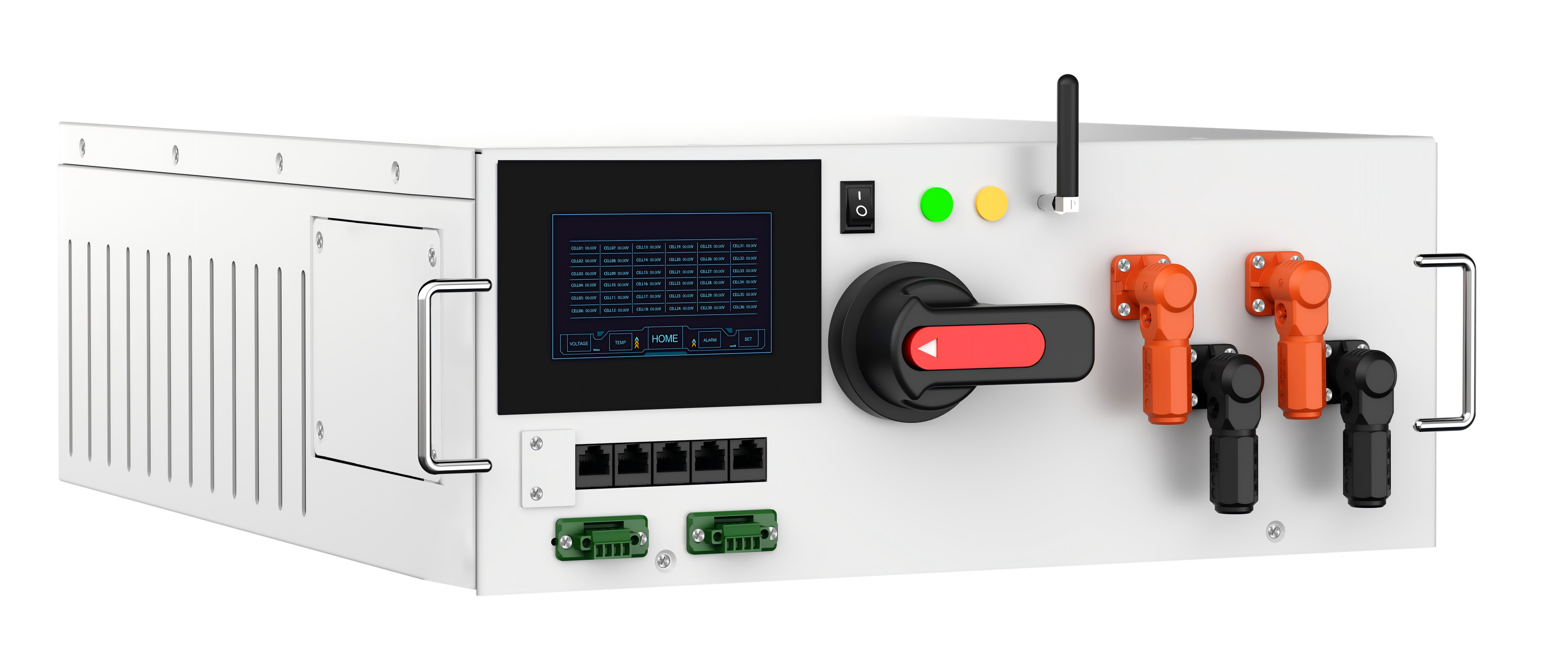
1. קופסת מתח גבוה (כולל בקרת ראשית)
היא אחראית להחלפת מעגלים של מתח גבוה, הפעלת רכיבים צדדיים כגון רלזים, טעינה מקדימה, מפוחים, הגנה מפני קצר, תקשורת, פעולות לוגיות, אסטרטגיות הגנה, הפצת פרמטרים, רישום תקלות ותקשורת חיצונית (485/CAN/Ethernet), והיא המבצע הבקרתי של מערכת ניהול הסוללות (BMS).
2. בקרה משנית
אוספת את מתח התא הפרטי ומדידה של הטמפרטורה, מבצעת איזון, ומעבירה את הנתונים למפקח הראשי.
3. קבלי חוט ורכיבים נלווים
קבל איסוף נתונים: מחבר את המפקח המשני לתאי הסוללה, ומאפשר לאסוף את מתח כל תא בנפרד.
קבל בקרת טמפרטורה: מחובר לחיישן NTC, לאיסוף מדידת הטמפרטורה.
קבל תקשורת: CAN/485, המאפשר תקשורת בין המפקח הראשי, המפקח המשני ומחשב המארח.
קבל כוח: כבל זרם גבוה ומתח גבוה, המחבר את הסוללה, קופסת המתח הגבוה והעומס.
קבל בקרה: מבצע בקרה על מגענים, מפוחים, נורות אינדיקציה וכו'.
 תכונות המערכת:
מערכת מרהיבת דו-כיוונית (PCS) + מומר פוטו וולטאי; לא כולל סוללות, מערכת ניהול סוללות (BMS), בקרת טמפרטורה ואבטחת אש. הלקוחות חייבים להרכיב בעצמם את צבירי הסוללות, את מערכת ניהול הסוללות (BMS) ואת armario הפצה. המומרים, הסוללות וה-BMS מגיעים מייצרנים שונים; התאימות והאישורים חייבים להיות מטופלים לחלוטין על ידי הלקוח. משמש בעיקר בחנויות קטנות, במפעלים קטנים, ביישובים איכותיים גבוהים ויישומים של מערכות פוטו-וולטאיות-אחסון בקנה מידה קטן.
הספק/קיבולת טיפוסיים: בעיקר 10 קילוואט–100 קילוואט
קיבולת: 50 קילוואט-שעה–120 קילוואט-שעה
מתח: ברובו מתח גבוה (DC 200–850V, AC 400V / תלת-פאזי)
ארון אחסון אנרגיה מסחרי ותעשייתי (ארון אחסון אנרגיה מסחרי ותעשייתי משולב)
1. ארון אחסון אנרגיה מונע באויר
קירור באמצעות מאוורר וזרימת אויר: עלות נמוכה, מבנה פשוט. מתאים ל: קיבולת קטנה, סביבה מתונה, תקציב מוגבל. חסרונות: הפרש טמפרטורות גדול, רעש גבוה ורמת הגנה ממוצעת.
2. ארון אחסון אנרגיה מונע בנוזל
לוח קירור נוזלי / קירור עטיפה
הפרש טמפרטורות קטן (<3°מ), חיים ארוכים, יעילות גבוהה, הגנה טובה
מתאים ל: הספק גבוה, צפיפות גבוהה, ייצוא לאיחוד האירופי, סביבות טמפרטורה גבוהה/נמוכה
תכונות המערכת:
זוהי מערכת אחסון אנרגיה מסוג 'הכנס והפעל' המאגדת בתוכה אשכולי סוללות, מערכת ניהול סוללות (BMS), מומר כוח (PCS), מערכת ניהול אנרגיה (EMS), בקרת טמפרטורה, הגנת שטיפון ואספקת חשמל לתוך Schrank סטנדרטי אחד לשימוש חוץ/פנים. המערכת נוצרה במיוחד למשתמשים תעשייתיים ומסחריים כגון מפעלים, מרכזי קניות, בנייני משרדים, מרכזי נתונים ופארקים תעשייתיים.
הספק/קיבולת טיפוסיים:
הספק: 50 קילוואט–500 קילוואט
קיבולת: 100 קילוואט-שעה–500 קילוואט-שעה
מתח: ברוב המקרים מתח גבוה (DC 600–1000V, AC 400V/שלב-שלושה)
פונקציית איזון
1. איזון פסיבי
אנרגיה התא של הסוללה בעלת המתח הגבוה נצרכת על ידי נגדים, מה שמביא למבנה פשוט, עלות נמוכה ויעילות נמוכה.
איזון פעיל
העברת האנרגיה בין תאי הסוללה מושגת באמצעות סלילים/קבלים, מה שמביא ליעילות גבוהה, ייצור חום נמוך, אך גם לעלות גבוהה.
הלקוחות חייבים לקחת בחשבון את התקציב שלהם, את עקביות התאים ואת קיבולת המערכת בעת בחירת מודל.
תיבת המתח הגבוה
1. מבנה פנימי טיפוסי של תיבת המתח הגבוה
מתג ראשי חיובי/שלילי
מתג טעינה מקדימה + נגד טעינה מקדימה
퓨ז של המתח הגבוה
מפסק מעגל של המתח הגבוה
חיישן זרם
בקרת פיזור חום/מאוורר
בלוק בקרה מרכזי (BCU), מודול WIFI, מסך
2. מהו טעינה מקדימה ולמה היא נדרשת?
טעינה מקדימה כוללת טעינה איטית של הקondenטור התחתון באמצעות זרם קטן לפני סגירת המגע הראשי, כדי למנוע נזק למגע, לקondenטור של הקו או לתאי הסוללה עקב גל זרם חזק. סגירת המעגל ישירות ללא טעינה מקדימה עלולה לגרום לזרם קשת, לשריפת מגעים ולחוסר הצלחה בהפעלת הגנת העומס העולה.
3. מהי הפונקציה של הנעילה הבטוחה של מתח גבוה (HVIL)?
הנתקה חובה של מוצא המתח הגבוה כאשר דלת תיבת המתח הגבוה נפתחת או כשמנותק צינור החיווט, מהווה מנגנון בטיחות חיוני לייצוא לאירופה ולדרום מזרח אסיה, כדי למנוע השראת זרם.
SOC&SOH
1. SOC (מצב הטעינה)
אחוז הסוללה משקף את היכולת הנותרת הנוכחית.
2. SOH (מצב הבריאות)
בריאות הסוללה משקפת את דרגת הידרדרות הקיבולת המרבית הניתנת לשימוש של הסוללה.
מהם רמות הגנה שונות של מערכת ניהול סוללות (BMS)?
1. התראה ברמה 1
הגבלת הספק/הפחתת הזרם, הנפצת התראה ולא ניתוק המפסק הראשי.
2. הגנה ברמה 2
כאשר הגבלת הספק היא 0, נעצרים טעינה ופריקה, מופעלת התראה ולא מתרחשת השבתת המפסק הראשי.
3. הגנה ברמה 3
ניתוק טעינה ופריקה כדי לכפות כיבוי.
פרוטוקולי תקשורת נפוצים של BMS
1. CANopen
CAN1 ו-CAN2 מחוברים ל-PCS או ל-MES.
2. Modbus RTU
RS485_1 ו-RS485_2, חיישנים למסכים, מזגנים, מערכות כיבוי אש ומערכות טבילה במים, וכדומה.
שאלות נפוצות בנוגע להתקנה וחיבורי מערכת המתח הגבוה: 
לאחר שעוברים את נקודות הידע לעיל, הגעתם לרמה של מתחילים. בהמשך נלמד את נקודות המפתח של כל מערכת הלחץ הגבוה.
 הזהרות
מהן קווי האדום הבטחוניים בעת שימוש במערכת ניהול סוללות (BMS)?
לאחר קבלת הסחורה, לא ידעתם כיצד להתקין או לחבר אותה. נקודות הידע הבאות יוכלו ללמד אתכם איך לעשות זאת. יש לשמור את הקישור הזה.
לפני התקנת מערכת ניהול הסוללות (BMS)
אילו הכנות חיוניות יש לבצע לפני התקנת מערכת ניהול הסוללות (BMS)?
אימות כיבוי החשמל: לוודא שהחבילה של הסוללות כבויה לחלוטין, ללא מתח שאריות על הדק הפולוס והדק המינוס (לMEDוד באמצעות מד-מתח).
בדיקה סביבתית: מיקום ההתקנה חייב להיות יבש, עם וентילציה טובה, רחוק מחומרים דליקים ומפוצצים, ועם מספיק מקום לפיזור חום (≥10 ס"מ).
הכנת כלים: פלך מבודד, משקפי בטיחות, מד רב-펑ציות, צינורות כיווץ בלחיצה, רצועות קשירה לכבלי חשמל, סרט בידוד.
אימות נתונים: לאשר שהמודל של מערכת ניהול הסוללות (BMS) תואם את מספר הרצועות של הסוללות והמתח שלהן; לאשר שהתרשים החיבורי תואם את הממשק הפיזי בפועל.
הגנה על האנשים: ללבוש כפפות מבודדות ומשקפי בטיחות; להימנע ממגע ישיר עם הדקיות במתח גבוה.
מה יש לאשר לפני חיבור מערכת ניהול הסוללות (BMS) לאחר שקרני הסוללה מחוברים בטור ובמקביל?
המתח הכולל: חייב להתאים לטווח המתח הנקוב של מערכת ניהול הסוללות (BMS) (המקסימום ≤1000V).
ההפרש במתח בין התאים הפרטניים: לאחר עמידה של שעה אחת, ההפרש במתח בין כל התאים הפרטניים חייב להיות ≤50 מ״ו (הפרש מתח גדול מדי דורש איזון).
טרמינלים חיובי ושלילי: הטרמינלים החיובי והשלילי של חבילת הסוללות מסומנים בבירור, מה שמונע את הסיכון לחיבור הפוך.
התנגדות בידוד: התנגדות הבידוד של חבילת הסוללות לאדמה, שנמדדת במגוהמטר, חייבת להיות ≥1 MΩ (הכרחית למערכות מתח גבוה).
מהן השיקולים העיקריים בחיבורי הרשת לאיסוף נתונים?
התאמה: מספר יציאת איסוף הבקרה המשנית מתאים אחד לאחד למספר תא הסוללה (למשל, יציאת הבקרה המשנית CELL1 מחוברת לטרמינל החיובי של תא הסוללה הראשון, CELL2 מחוברת לטרמינל החיובי של תא הסוללה השני, וכן הלאה).
איסור על הפיכת הקטבים: אסור לחלוטין להפוך את הטרמינלים החיובי והשלילי או לחבר בין מקטעים (למשל, לדלג על תאי סוללה ולחבר ישירות).
מגע בטוח: יש למשוך את הדקים במקומם, ללא רפיון או חיבור לקוי (ניתן למשוך בעדינות את רתמת החוטים כדי לוודא שהיא לא משתחררת).
הגנה על בידוד: חיבורי הכבל לאיסוף עטופים בצינורית מתכווצת בחום כדי למנוע קצרים; harness החוטים מוחזק רחוק מקווי החשמל כדי להפחית הפרעות.
רזרבה: מאחסנים אורך רזרבה של 5–10 ס"מ בכבל לאיסוף כדי למנוע התנתקות החיבורים עקב משיכה.
מהן הדרישות המרכזיות לקליטת קווי תקשורת (CAN/485)?
כבל CAN:
בחירת כבל: יש להשתמש בכבל CAN מסולסל ומבוקר (למשל, CAN-H ו-CAN-L מסולסלים יחד, עם שכבת שילדה מחוברת לאדמה).
נגד סיום: יש לחבר נגד סיום של 120Ω לשני קצות העבירה (בקצה הראשי ובקצה הרחוק ביותר של ההתקן המשני/מחשב המארח).
הבחנה בקוטביות: יש לחבר את CAN-H ל-CAN-H ואת CAN-L ל-CAN-L. אסור במפורש להפוך את החיבורים (חיבור הפוך יגרום לחוסר תקשורת וללא הודעה על שגיאה).
חיבוב השילדה לאדמה: יש לחבר את השילדה לאדמה בקצה אחד בלבד (מומלץ לחבר לאדמה בקצה הראשי) כדי למנוע הפרעות נגרמות על ידי זרם מעגלי הנוצר מחיבור לאדמה בשני הקצוות.
כבל 485:
הבחנה בקוטביות: לחבר A ל-A, B ל-B, טרמינל משותף GND הוא אופציונלי (מומלץ למרחקים ארוכים).
דרישות לכבל: כבל משוריין, באורך שאינו עולה על 1200 מטר (נדרש מחובר לחזרה עבור מרחקים ארוכים יותר).
מהם השלבים והאזהרות להתקנת חוטים לתיבת המתח הגבוה ולבקרת מערכת הסוללות (BMS)?
שלבים:
1. לחבר את קווי הבקרה של תיבת המתח הגבוה (ניעור המגע, אות הטעינה הקדימה, מעגל HVIL) ליציאות המתאימות בבקר הראשי.
2. לחבר את קו האות של חיישן הזרם לבקר הראשי (לוודא שהקוטביות החיובית והשלילית מתאימות לכיוון זרימת הזרם).
3. לחבר את קו בקרת המניע של מאוורר התיבת מתח גבוה (אם רלוונטי).
4. בדוק את הקוטביות של כל קווי הבקרה; אבטח את רתמת החיווט לאחר אישור שאין חיבורים הפוכים.
אמצעי זהירות:
טרמינלים במתח גבוה: להדק לפי מומנט הדרוש (בדרך כלל 8–10 N·m לברגים מסוג M5) כדי למנוע הדקיקה חלשה וחימום.
מעגל HVIL: ודא שקיים מגע טוב במגעיות הנעילה של דלת תיבת המתח הגבוה ומחברי הכבלי חיווי; המעגל חייב להפעיל התראה בעת ניתוק.
מעגל הקדמה: ודא שהחיווי של נגד ההכנה מוצב באופן בטוח וחופשי מחיבורים רפויים (חיבורים רפויים יגרמו לכשל בהכנה).
מהו מיקום ההתקנה והדרישות לחיווי של חומר מדידת הטמפרטורה (NTC)?
מיקום ההתקנה: צבע את החומר על פני תא הסוללה באופן יציב (העדפה ליד הטרמינל החיובי או במרכז חבילת הסוללות, שם פיזור החום נמוך), וצמד אותו באמצעות רצועות קשירה כדי למנוע שהוא יתנדנד באוויר.
דרישות חיווי: חוטי החומר חייבים להיות שלמים, ללא קצר, ואורכם חייב להיות מתאים (למנוע משיכה).
בעת שימוש בכמה חומרים, מספר החומר חייב להתאים למספר הערוץ שנקבע בלוח הבקרה הראשי (למשל, חומר 1 מחובר ליציאת TEMP1 של לוח הבקרה הראשי).
אל תחברו את הסonde לקווי חשמל או למשטח של אלמנטי חימום (דבר זה יגרום לעיוות בזיהוי הטמפרטורה).
אילו הם התקנות הבטיחותיות להתקנת כבל החשמל?
התאמת קוטר התיל: בחרו את קוטר התיל בהתאם לזרם המרבי של המערכת (למשל, תיל נחושת בקוטר 16 מ"מ² עבור זרם של 100 אמפר) כדי למנוע חימום יתר עקב קוטר תיל לא מספיק.
הגנה על השכבה המבודדת: עטפו את מחברי קווי החשמל בכיסויים מבודדים והרחיקו אותם מקווי איסוף הנתונים ותקשורת (מרחק ≥ 5 ס"מ).
סימון הקוטביות החיובית/שלילית: הבחינו בבירור בין הקוטב החיובי לקוטב השלילי באמצעות סרט אדום/שחור או תוויות כדי למנוע חיבור הפוך.
דרישות הקבעה: הקפידו לקבע את קו החשמל בעזרת תומכות או רצועות קשירה כדי למנוע ה afslaxing של המחברים בעקבות רעידה.
התקנת ה-BMS בתהליך
מהם צעדי הבדיקה העצמית לפני הפעלת ההתקן לאחר ההתקנה?
בדיקת כבל החיבורים:
כבלים לאquisition: אין חיבורים הפוכים, חיבורים דילוגיים או חיבורים רופפים; הטרמינלים נחוצים כראוי.
כבלים לתקשורת: הקוטביות של CAN/485 נכונה; התנגדויות סיום מותקנות.
כבלים לבקרה ברמה גבוהה של מתח: הרציפות של מעגל HVIL תקינה; חיווט מעגל הפרה-טעינה תקין.
אספקת מתח: מתח אספקת המתח הראשי של בקרת המחשב מקיים את הדרישות (למשל, 12V/24V); טרמינלי המתח החיובי והשלילי אינם הפוכים.
בדיקה במולטימטר: אין קצר באף אחד משני קצות כבלי האquisition (למדוד התנגדות בין כבלי אquisition סמוכים; ערכה חייב להיות אינסופי).
אין קצר בין שכבת השריון של כבל התקשורת לבין החוטים הליבה שלו.
אין קצר בין טרמינלי המתח הגבוה; המתח הכולל תקין.
לאחר התקנת מערכת BMS
מהו סדר ההפעלה הנכון להפעלה הראשונה לאחר הדלקת המתח?
שלבים:
1. להדליק את הבקר הראשי (מתח נמוך) ולבדוק האם מדגמי המצב של הבקר הראשי תקינים (נורית המתח דולקת, ואין נוריות תקלה או אזעקות).
2. חבר את תוכנת האבחון וקרא את סטטוס התקשורת של בקר המשנה (כל בקרי המשנה מחוברים, ללא ניתוקים).
3. קרא את מתח והטמפרטורה של כל יחידה בנפרד (הנתונים יציבים, ללא ערכים חריגים כגון 0V או טווח מלא).
4. הפעל את בדיקת הקדמה (הפעלה תוכניתית או חומרתית) וודא שהקדמה הצליחה (זמן הקדמה הוא בדרך כלל 1–3 שניות).
5. סגור את המגען הראשי ובדוק שאין תופעות לא נורמליות לפני חיבור העומס או המטען.
פעולת התקנה שגויה
אילו טעויות נפוצות נגרמות במהלך ההתקנה? מהן התוצאות שלהן?
שגיאה 1: חיבור הפוך של קווי האיסוף/חפיפה של חתכים → תוצאות: איסוף מתח שגוי, דיווח על תקלה של מתח נמוך מדי/גבוה מדי, פגיעה ביציאות האיסוף של בקר המשנה.
שגיאה 2: חיבור הפוך של קווי התקשורת/חוסר נגד מסיים → תוצאות: אין תקשורת, אובדן חבילות נתונים, אי-יכולת לשלוח פרמטרים.
שגיאה 3: חיבורי המתח הגבוה לא מודקים → תוצאות: התנגדות מגע גבוהה מדי שגורמת לחימום יתר, שריפת החיבורים וסיכון לשריפה.
שגיאה 4: חיישן בקרת הטמפרטורה לא מאובטח → תוצאות: זיהוי לא מדויק של הטמפרטורה, הפעלה שגויה של הגנת החימום העודף, סיכון לחימום יתר של הסוללה.
שגיאה 5: חיבור ללא ניתוק המתח → תוצאות: סכנת הלם חשמלי, קצר, נזק ל-BMS או לסוללה.
שאילתות נפוצות לגבי ניפוי תקלות ואבחון תקלות:
קישור לאיסוף. התוכן הבא יכסה ניפוי תקלות ופתרון בעיות. מהנדסי אחסון אנרגיה מקצועיים במתח גבוה משתפים שאלות נפוצות.
 קטגוריה של תקלות: תקלות בה alimentation (אספקת חשמל)
1. תופעת התקלה: קופסת המתח הגבוה אינה מופעלת, ומנורת המתח כבויה.
 סיבות אפשריות:
1. מתח אספקה נמוך מדי/חיבור הפוך;
2. מצב הפעלה/כיבוי ידני של קופסת המתח הגבוה;
3. ממשק הפעלה עיקרי של הספקת החשמל רופף/פגום;
4. כשל בהספקת החשמל.
 שלבי הבדיקה:
1. השתמשו במולטימטר למדידת מתח הספקת החשמל (למשל, 12 וולט/24 וולט) כדי לאשר שהוא עומד בדרישות, ושקטבים חיובי ושלילי מחוברים כראוי;
2. בדקו את מצב ההפעלה הידנית (ON/OFF) של קופסת המתח הגבוה;
3. חיברו מחדש את מתח החשמל כדי לבדוק אם החיבור רופף;
4. החליפו את מקור הספקת החשמל (למשל, ממיר, סוללה) ובצעו בדיקה כדי לאשר שהספקת החשמל תקינה.
 פתרון:
1. התאימו את מתח הספקת החשמל ותקנו את הקוטביות;
2. העבירו למצב הפעלה (ON);
3. תקנו או החליפו את ממשק הפעלה עיקרי של הספקת החשמל;
4. להחליף את מזין החשמל הפגום.
2. תיבת המתח הגבוה הופעלה ולאחר מכן נותקה מיידית.
סיבות אפשריות:
1. זרם מזין חשמל לא מספיק;
2. קצר ביחידת הבקרה הראשית (תקלה פנימית);
3. הופעל הגנה מפני עומס יתר.
שלבי הבדיקה:
1. לבדוק אם הזרם הנומינלי של מזין החשמל עומד בדרישות יחידת הבקרה הראשית (בדרך כלל ≥2 אמפר);
2. לנתק את כל העומסים המחוברים לשליטה הראשית (כגון וحدות בקרה משניות ומנועי מגענים), ולספק חשמל לשליטה הראשית לבדה. לצפות האם מתרחשת הפסקת חשמל;
3. להשתמש ברובה מדידה למדוד את ההתנגדות לאדמה במבוא מזין החשמל של השליטה הראשית. אם ההתנגדות היא 0 אוהם, זה מצביע על קיצור פנימי.
פתרון:
1. להחליף את מזין החשמל במזין שמספק זרם גבוה יותר;
2. אם הפסקת החשמל ממשיכה גם כאשר משתמשים במזין חשמל נפרד, יחידת הבקרה הראשית פגומה; יש לבקש החלפה;
3. בדקו אם קיימים קצרות במעבד, תקנו אותן ולאחר מכן חברו מחדש.
קטגוריית התקלה: כשלים בתקשורת
1. התקשורת בין המחשב המארח לבין מערכת ניהול הסוללות (BMS) נותקה.
סיבות אפשריות:
1. חוסר תאימות פרוטוקול תקשורת;
2. שגיאת חיווט;
3. התנגשות בכתובת תקשורת;
4. שגיאה בהגדרת פרמטרי התקשורת של מערכת ניהול הסוללות (BMS).
שלבי הבדיקה:
1. אשרו שהפרוטוקול המשמש לתקשורת (למשל Modbus RTU או CANopen) והערוץ שנבחר תואמים בין המחשב המארח למערכת ניהול הסוללות (BMS);
2. בדקו את חיווט RS485/CAN/אترنت כדי להבטיח שהוא תקין;
3. ודאו שכתובת התקשורת של מערכת ניהול הסוללות (BMS) אינה מתנגשת עם מכשירים אחרים;
4. וודאו את פרמטרי התקשורת של מערכת ניהול הסוללות (BMS) (למשל: קצב העברת נתונים, ביטים נתונים, ביטי עצירה, ביטי זוגיות).
פתרון:
1. סטנדרטיזציה של פרוטוקול התקשורת;
2. חיבור כבלים תקין;
3. איפוס כתובת התקשורת של מערכת ניהול הסוללות (BMS);
4. התאמת פרמטרי התקשורת כדי להתאים.
2. המחשב המארח אינו יכול להתחבר ליחידת הבקרה הראשית.
סיבות אפשריות:
1. הגדרות לא תקינות של מספר פורט הסדרתי/קצב העברת הנתונים;
2. הדרייבר לא הותקן/התקנתו נכשלה;
3. חיבור רופף/הפוך של כבל התקשורת;
4. נזק בפורט התקשורת של יחידת הבקרה הראשית;
5. גרסת תוכנה לא תואמת.
שלבי הבדיקה:
1. וודאו את מספר פורט הרצף (בדקו במנהל ההתקנים) ואת קצב התקשורת (הברירת המחדל היא בדרך כלל 9600 ל-RS485 או 500k ל-CAN, עיינו במדריך);
2. התקינו מחדש את הדרייבר (ספקו את קובץ הדרייבר המתאים);
3. בדקו את חיבורי כבל התקשורת (למשל, האם הפולריות של המתח הגבוה/נמוך או החיובי/שלילי הופכו), וחיברו מחדש;
4. החליפו את כבל התקשורת וממיר ה-USB לרצף, ובצעו בדיקה אם הוא פועל כראוי;
5. שדרגו את תוכנת הניפוי לשגרה האחרונה.
פתרון:
1. הגדרו נכון את מספר פורט הרצף וקצב התקשורת;
2. התקינו את הדרייבר התואם;
3. תקנו את חיבורי כבל התקשורת;
4. החליפו את מכשיר התקשורת הפגום;
5. אם החיבור עדיין נכשל, קבעו שיציאת התקשורת של בקרת הראשית פגומה ודרשו תיקון.
3. התקשורת בין הבקר הראשי לבקרים המשניים אינה תקינה (חלק מהבקרים המשניים או כולם לא פעילים).
סיבות אפשריות:
1. ניתוק קו התקשורת;
2. חיבור הפוך/느לוז/קצר בקו התקשורת;
3. כשל בחומרה של בקר משני.
שלבי הבדיקה:
1. בדקו את אמינות קווי התקשורת בכל הצמתים;
2. בדקו את חיבורי כבל התקשורת של CAN/485, תקנו חיבורים הפוכים, חברו מחדש והפרידו את המתחברים, ומדדו קצרים (התנגדות אינסופית);
3. חברו כל בקר משני בנפרד לבקר הראשי כדי לבדוק האם התקשורת תקינה ולאתר את הבקר המשני הפגום.
פתרון:
1. חבר מחדש את רתמת החיווט;
2. תקנו את חיבורי קו התקשורת והחליפו את קו התקשורת הפגום;
3. להחליף את בקר הלווי הפגום.
4. שגיאת תקשורת בין מערכת ניהול הסוללות (BMS) וההופך (PCS) / ההופך אינו מקבל נתונים מ-BMS או сообщает על שגיאת תקשורת.
סיבות אפשריות:
1. ניתוק קו התקשורת;
2. חיבור הפוך/느לוז/קצר בקו התקשורת;
3. הגדרת ממשק תקשורת שגויה;
4. אי התאמה בפרוטוקול התקשורת.
שלבי הבדיקה:
1. לבדוק את אמינות חיבור קו התקשורת של כל צומת;
2. לבדוק את חיבורי קווי התקשורת של CAN/485, לתקן חיבורים הפוכים, לחבר מחדש ולנתק את המתחברים, ולמדוד אם יש קצר (התנגדות אינסופית);
3. לבדוק בנפרד את הגדרת ממשק התקשורת של מערכת ניהול הסוללות (BMS) ברכב ואת הגדרת ממשק ה-PCS;
4. לבדוק אם מחשב המארח של BMS מתאים באופן נכון לפרוטוקול של ההופך.
פתרון:
1. חבר מחדש את רתמת החיווט;
2. לתקן את חיבורי כבל התקשורת ולהחליף כל כבל תקשורת פגום;
3. להדק מחדש את חיבורי התקשורת;
4. הגדרת פרוטוקול התקשורת הנכון במחשב המארח.
קטגוריה של תקלה: תקלות באיסוף ובהגנה
1. איסוף מתח התא הפרטני הוא לא תקין (מוצג כ-0V / סקלה מלאה / תנודות גדולות)
סיבות אפשריות:
1. כבל האיסוף רפוי, הפוך או קצר;
2. יציאת האיסוף המשנית פגומה;
3. תא הסוללה פגום (למשל: נתק / קצר);
4. הפרעות המשפיעות על כבל האיסוף.
שלבי הבדיקה:
1. חיבור מחדש והסרת כבל האיסוף, בדיקת נכונות החיווט (בהתאם למספר התא) ומדידת קיומם של קצר או נתק בשני קצות כבל האיסוף;
2. החלפת ערוץ האיסוף המשני (למשל: חיבור כבל האיסוף של הערוץ הלא תקין לערוץ זמני) ובדיקה האם המערכת חוזרת למצב תקין;
3. מדידת מתח התא הלא תקין ישירות באמצעות מולטימטר. אם מתח התא אינו תקין (0V / גבוה מדי), יש להחליף את התא;
4. בדקו אם כבל האיסוף נמצא קרוב לקו החשמל, חיברו אותו מחדש והוסיפו אמצעי שילוט.
פתרון:
1. תקנו את חיבורי כבל איסוף הנתונים והחליפו את כבל איסוף הנתונים שניזוק;
2. החליפו את בקר העבד הפגום;
3. החליפו את תא הסוללה שניזוק;
4. אופטימזציה של החיבורים כדי להפחית הפרעות.
2. התראה על טמפרטורה (התראה שגויה / אין התראה)
סיבות אפשריות:
1. חיבור חסר של חיישן הטמפרטורה / חיבור הפוך / נזק לחיישן;
2. מגע לקוי של החיישן;
3. הגדרות לא מתאימות לפרמטרי הגנת הטמפרטורה;
4. ערוץ איסוף טמפרטורה פגום בבקר עבד.
שלבי הבדיקה:
1. בדקו את חיבורי הסonde לשליטה בטמפרטורה כדי להבטיח שלא הופכו או רופים. מדדו את התנגדות הסonde (סונדות NTC הן בדרך כלל 10 קילו-אום/50 קילו-אום בטמפרטורת החדר). אם ההתנגדות היא 0 או אינסופית, החליפו את הסonde.
2. הקשירו מחדש את הסonde, תוך וידוא שהוא מחובר באופן מוצק לפני השטח של תא הסוללה ולא תלוי באוויר.
3. וודאו את פרמטרי הגנת הטמפרטורה (נקודת הגנה מפני עלייה בטמפרטורה היא בדרך כלל 45–55°מ, ונקודת הגנה מפני ירידה בטמפרטורה היא בדרך כלל 10-–0°מ), והתאמו אותם לצרכים המוחלטים.
4. החליפו את ערוץ איסוף הטמפרטורה של הבקר המשני ובצעו בדיקה כדי לוודא שחזרה לפעולת נורמלית.
פתרון:
1. תקנו את חיבורי הסonde והחליפו את הסonde הפגוע;
2. הקשירו מחדש את הסonde;
3. התאמו את פרמטרי הגנת הטמפרטורה;
4. החליפו את בקר המשנה הפגוע.
3. קריאת הלחץ הכולל לא תקינה (מתוארת כ-0 וולט / הערך האמיתי שונה)
סיבות אפשריות:
1. חיבור המעגל הראשי של קו החשמל רופף / פיקוח ידני לא הופעל;
2. יציאת איסוף הבקרה הראשית נפגעה.
שלבי הבדיקה:
1. חברו מחדש והוציאו את כבל החשמל הראשי, בדקו אם החיווט תקין, ושימרו מד-מתח כדי למדוד ישירות את המתח הכולל בשני קצות המערכת כדי לבדוק אם יש קצר או נתק. אשרו שהבקרה הידנית מופעלת;
2. חזقوا את חיבור ערוץ איסוף הבקרה הראשית וצפו אם הוא חוזר למצב נורמלי.
פתרון:
1. הוציאו והכניסו מחדש את כבל החשמל, ולאחר מכן סגרו את המפסק הידני;
2. החליפו את יחידת הבקרה הראשית הפגומה או החליפו את קופסת המתח הגבוה ישירות.
4. עצירת הגנה בעת טעינה/פריקה (מדווח על תקלות של עליית מתח/נפילת מתח/זרם יתר/חום יתר)
סיבות אפשריות:
1. מתח התא/טמפרטורה עולה על טווח ההגנה;
2. הגדרות פרמטרי ההגנה אינן מתאימות;
3. תקלה בחיישן הזרם;
4. מגע לקוי של צירור החיווט;
5. תקלה במערכת הטעינה/הטעינה.
שלבי הבדיקה:
1. השתמשו במולטימטר למדידת מתח התא הכולל, מתח התא הפרטי וטמפרטורה כדי לאשר אם טווח ההגנה אכן חרג מהגבולות;
2. אמתו את פרמטרי הגנת ה-BMS (נקודת המתח המרבי היא בדרך כלל 1.1 פעמים מתח התא הנקוב, נקודת המתח המינימלי היא 0.85 פעמים, ונקודת הזרם המרבי היא 1.2–1.5 פעמים זרם המערכת הנקוב). אם ההגדרות אינן סבירות, ערכו את הפרמטרים;
3. בדקו את חיבורי חיישן הזרם ומדדו את אות הפלט של החיישן. אם האות לא תקין, החליפו את החיישן;
4. בדקו את כבל הכוח והמחברים על מנת לזהות רופפות, ודאגו לחזק אותם מחדש;
5. פסיקו את העומס/המטען ובצעו בדיקה נפרדת של ה-BMS. אם הגנה זו כבר אינה מופעלת, בצעו אבחון תקלות בעומס/המטען.
פתרון:
1. שווינו את מתח התאים / התאימו את טמפרטורת הסביבה;
2. שיפרו את פרמטרי ההגנה;
3. החליפו את חיישן הזרם הפגום;
4. תקנו בעיות מגע בכבל החיווי;
5. להחליף את מטען/הטעינה הפגוע.
5. פונקציית האיזון אינה פועלת.
סיבות אפשריות:
1. פונקציית האיזון לא מופעלת;
2. הפרש המתח בין התאים אינו מגיע לסף האיזון;
3. מודול האיזון ניזוק;
4. תקשורת לא תקינה בין בקר המשנה לבקר הראשי;
5. הגדרות פרמטרי האיזון אינן מתאימות.
שלבי הבדיקה:
1. להשתמש בתוכנת ניפוי שגיאות כדי לבדוק אם פונקציית האיזון מופעלת (לרוב היא מופעלת כברירת מחדל). אם לא, יש להפעיל אותה ידנית.
2. למדוד את הפרש המתח בין התאים הבודדים. אם הפרש המתח קטן מסף האיזון (בדרך כלל 50–100 מיליוולט), יש להשאיר את חבילת הסוללות במנוחה עד שההפרש במתח יגיע לסף, ולאחר מכן לצפות.
3. להדליק מחדש, לבצע בדיקת עצמית של המערכת ולבדוק את מצב האיזון.
4. בדקו את התקשורת בין בקר הראשי לבקר המשנה כדי להבטיח תקשורת תקינה.
5. התאימו את פרמטרי ההשוואה (למשל זרם השוואה וזמן השוואה).
פתרון:
1. הפעילו את פונקציית ההשוואה;
2. אפשרו לארגז הסוללות להישאר ללא תנועה או יצרו באופן ידני הפרש לחץ;
3. אם מוצג כשל, החליפו את לוח הבקרה המשני הפגום;
4. תקנו את כשלות התקשורת;
5. שיפרו את פרמטרי ההשוואה.
קטגוריית כשל: כשלים הקשורים לארגז המתח הגבוה
1. הכנת המתח מראש נכשלה (דווח על כשל בהכנה מראש)
סיבות אפשריות:
1. נגד ההכנה מראש ניזוק (נתק/קצר);
2. מגען הטעינה הקדימה פגום (לא ננעל/המגעים תקועים);
3. מעגל המתח הגבוה פתוח/קצר;
4. señal הטעינה הקדימה של בקר הראשי לא נשלח.
שלבי הבדיקה:
1. מדוד את התנגדות הטעינה הקדימה (בדרך כלל 10–100 אום). אם ערכה 0 או אינסוף, החלף את נגד הטעינה הקדימה.
2. aliment את מגען הטעינה הקדימה בנפרד ובדוק אם הוא ננעל. מדוד את רציפות המגעים. אם הוא פגום, החלף את מגען הטעינה הקדימה.
3. בדוק את מעגל המתח הגבוה (חבילת הסוללות, קופסת המתח הגבוה, העומס) למציאת חיבורים פתוחים/קצרים ותקן את הפגמים.
4. השתמש בתוכנת ניפוי שגיאות כדי לבדוק האם הבקר הראשי שולח אות טעינה קדימה. אם לא, בדוק את הגדרות הפרמטרים של הבקר הראשי או את קיומו של פגם בבקר הראשי.
פתרון:
1. החלף את נגד הטעינה הקדימה;
2. החלף את מגען הטעינה הקדימה;
3. תקן את הפגם במעגל המתח הגבוה;
4. התאם את פרמטרי הבקרה העיקריים או החלף את יחידת הבקרה הראשית.
2. הרילאי אינו ננעל (מגשיך ראשי / מגשיך טעינה מוקדמת)
סיבות אפשריות:
1. לא נשלח אות הפעלה מהבקרה הראשית
2. סליל המגשיך פגום או יש חוסר בהספק החשמלי
3. המגשיכים תקועים או נעולים מכנית;
4. מצב ההגנה לא בוטל (למשל הגנה מפני עליית מתח/עליית טמפרטורה).
שלבי הבדיקה:
1. השתמש באוסצילוסקופ למדוד את הפלט של יציאת הפעלה של הבקרה הראשית. אם אין אות, בדוק את פרמטרי הבקרה הראשית או בדוק אם קיימת תקלה בבקר הראשי.
2. מדוד את מתח האספקה לסליל המגשיך (בדרך כלל 12 וולט/24 וולט) כדי להבטיח אספקת חשמל תקינה. מדוד את ההתנגדות של הסליל (בדרך כלל עשרות אוהם). אם התוצאה לא תקינה, החלף את הסליל או את המגשיך.
3. הפעל ידנית את המגשיך ובדוק אם הוא תקוע. אם הוא תקוע, פתר אותו, נקה אותו או החלף אותו.
4. בדוק את מצב ההגנה של מערכת ניהול הסוללות (BMS) ובטל כל הגנות פעילות (כגון קירור או איזון מתח).
פתרון:
1. לתקן את אות הנהגה של וحدת הבקרה הראשית או להחליף את וحدת הבקרה הראשית;
2. להבטיח את אספקת החשמל לסליל ולהחליף את המפסק הפגום;
3. לנקות או להחליף את המפסק הנעולה;
4. לבטל את הגנת מערכת ניהול הסוללות (BMS).
4. התאם את פרמטרי הבקרה העיקריים או החלף את יחידת הבקרה הראשית.