
 EN
EN
JKESS / ENGINEERING GUIDE
Get a Quote →HV BMS Master Box Integration: CAN, RS485 & Daisy Chain Wiring Guide for System Integrators
5 RJ45 ports, 1 5-pin power socket, 1 AC input — and one terminal resistor that most integrators forget. Here is the complete wiring logic for HV-BC250 and HV-BC150-100A master boxes.
Why Master Box Integration Fails (And It’s Rarely the Hardware)
During energy storage commissioning, a communication fault does not automatically mean the master box is defective. Start with the wiring logic: an RJ45 cable in the wrong port, mismatched CAN or RS485 settings, missing required termination, or signal wiring routed too close to power cables. These checks can resolve a fault before unnecessary hardware replacement.
Consider a typical troubleshooting example: after assembly and power-on, the master LCD reports a slave communication error. The cause is a 4G gateway cable connected to the BMU daisy-chain port. The five RJ45 connectors look alike, but their signal assignments and connected devices differ. Port labels and a verified pinout are more useful than connector shape.
A second issue is the omitted chain-end terminator. Longer cable runs, branches, connector discontinuities, and incorrect termination can affect signal integrity as a system expands. An eight-box count is not a universal electrical boundary. First distinguish the external CAN network from the isolated BMU daisy chain, then apply the termination specified for that interface.
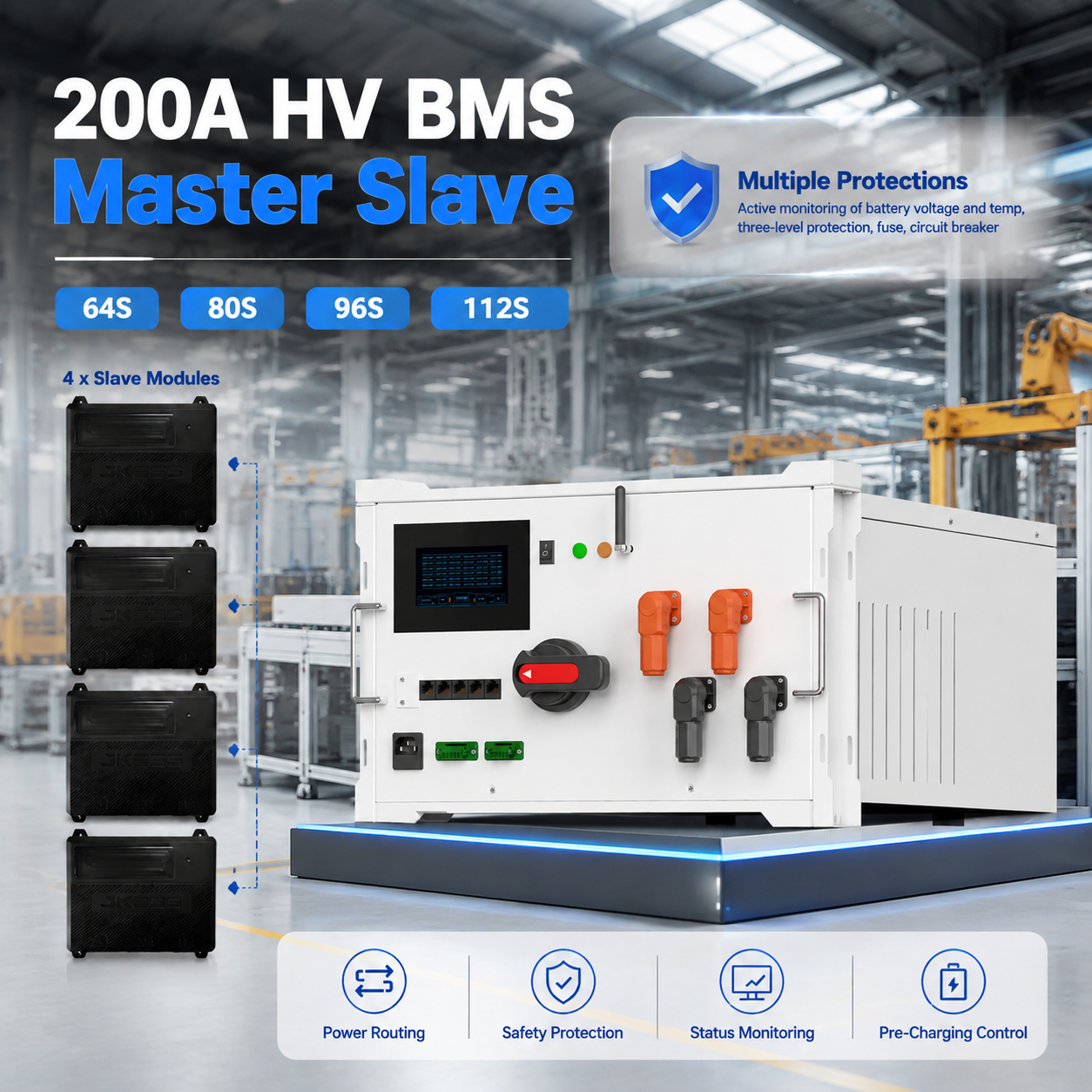
This guide organizes the interface definitions for HV-BC250 and HV-BC150-100A into a practical commissioning reference. The port mapping and component part numbers below describe the configuration covered by this guide; verify them against the delivered unit’s label, revision, pinout, and approved project wiring diagram.
The 5 RJ45 Ports: Function Mapping (Do Not Mix Them Up)
The described front-panel configuration has five RJ45 ports. Although their physical connectors look identical, their functions, connected devices, and communication protocols differ. RJ45 is a connector format here, not an indication of Ethernet or PoE support.
| Port label | Connects to | Communication interface | Rate / specification | Function |
|---|---|---|---|---|
PCS |
PCS / EMS / supervisory controller | CAN2 | 250k / 500k | Communication with the power conversion system and energy management system |
IOT |
4G gateway | CAN2 | 250k / 500k | Cloud data upload and remote monitoring |
BMU |
Slave box 1 | Isolated daisy chain | Per approved BMU protocol | Collects data from the slave modules in the battery cluster |
DEBUG |
Service / debugging equipment | CAN1 | 250k / 500k | On-site diagnostics and authorized firmware updates |
LCD |
Local display | RS485-1 | 9600 / 115200 | Local parameter display and operation |
Power, Indicator, and AC Interfaces
Identify the low-voltage supply, external indicator connector, AC inlet, and HV protection devices separately from communication ports. The following part numbers and ratings are configuration references; use the approved bill of materials for the delivered unit.
| Interface | Specification | Function | Notes |
|---|---|---|---|
| 5-pin power / CAN connector | 15EDGKPM-3.81-5P |
24V supply input/output and reserved CAN connection | Mating plug: 15EDGK-M-3.81mm-5P; verify pinout and supply direction |
| 4-pin indicator connector | 15EDGKPM-3.81-4P |
External running / fault indicators | Mating plug: 15EDGK-M-3.81mm-4P
|
| AC appliance inlet | 220VAC, 10A | AC auxiliary power input | Inlet specified with a 10A fuse; verify the installed assembly |
| Rocker switch | ON / OFF | Low-voltage power switch | Operating position: ON; isolate all sources for service — OFF alone is not HV isolation |
| Power connectors | B-E80 series | BAT+ / BAT− / PCS+ / PCS− | Connector rating: 1500V DC, 250A; this does not increase the master’s system rating |
| Molded-case circuit breaker | 125A / 200A | Manual switching of the battery cluster circuit | Standard protection assembly; rating depends on variant |
| Fuse | 160A / 250A | Main-circuit overcurrent protection | Standard protection assembly; select the specified variant |
Auxiliary power arrangements can vary. Confirm whether the unit uses AC input, an external 24V supply, or another approved option; do not parallel supply sources without a wiring diagram that permits it. The 1500V / 250A connector rating does not override the 80–1000V DC operating range or the 100A / 200A master rating.
Correct Wiring Sequence vs Common Mistakes
Use this sequence to identify and verify signal and auxiliary connections with the system isolated. Complete the separate HV installation checks and the approved commissioning procedure before applying power. DEBUG equipment and optional gateways are connected only when required by the project.
The Terminal Resistor: Why 8+ Slave Boxes Need Extra Attention
A conventional high-speed CAN bus carries differential signals over a transmission line. Incorrect or missing end termination allows reflections that can interfere with communication. Cable length, stub length, topology, and signal edge timing matter; increasing the node count does not create a universal point at which termination suddenly becomes necessary.
For a conventional high-speed CAN bus, provide the specified termination at both physical ends, typically 120 Ω at each end. Check whether end devices already contain enabled terminators before adding external parts. The master can be one physical end of a CAN network. Do not add a resistor at every node.
The BMU isolated daisy chain is a separate interface. For the described 4–16 slave-box arrangement, confirm the dedicated chain-end accessory, port, and maximum cable length with the JKESS wiring diagram. For configurations above eight boxes, explicitly review topology and cable length; do not interpret that as permission to omit required termination from a smaller system, or as proof that a generic 120 Ω CAN resistor belongs on a BMU port.
Symptoms to investigate
- Intermittent slave communication alarms on the master LCD.
- Slave-to-master handshake response exceeding the <1 s project target.
- Gaps or irregular timestamps in cloud monitoring data.
- Delayed or missing active balancing commands.
These symptoms are not specific to termination. Check node power, harness continuity, device configuration, and interference as part of the same fault investigation.
| Slave boxes | Termination requirement | Communication planning |
|---|---|---|
| 4–8 | Fit the approved chain-end terminator wherever the model diagram requires it. | A small node count does not waive termination requirements; verify cable length and routing. |
| 9–12 | Explicitly confirm the JKESS end-termination requirement and fit the specified part. | Check the full chain under operating conditions; missing required termination can cause intermittent faults. |
| 13–16 | Confirm supported topology, chain-end termination, and maximum cable length before commissioning. | Verify every node and the handshake target; box count alone does not determine signal integrity. |
Technical reference: JKESS high-voltage BMS communication guidance. Confirm the applicable bus type and product revision before applying a termination rule.
Communication Parameters: Baud Rate, Handshake, and Protocol
A matching connector and matching rate are only the starting point. Agree the signal pinout, application protocol, addressing, and firmware configuration with the PCS/EMS or display supplier before commissioning.
| Parameter | Specification | Notes |
|---|---|---|
| CAN channels | 2: CAN1 + CAN2 | CAN1 for DEBUG; CAN2 for PCS / IOT in the described interface mapping |
| CAN bit rate | 250k / 500k | 250 / 500 kbit/s; match the PCS/EMS rate and application protocol |
| RS485 channels | 2: RS485-1 + RS485-2 | RS485-1 for LCD; confirm RS485-2 pin allocation in the model documentation |
| RS485 baud rate | 9600 / 115200 | Match the display settings, including framing and device address |
| Daisy-chain protocol | Isolated BMU link | HV-BC250 public product information uses IPO/IMO. Confirm the exact interface designation and pinout for the delivered revision. |
| Slave-to-master handshake | <1 s | Configuration acceptance target; confirm the firmware-specific measurement method |
| Insulation resistance | ≥1 MΩ at 1,000 VDC | Use only under an approved model-specific test procedure with defined test points and electronics isolation |
Commissioning Checklist: 14 Checks Before and After Power-On
Complete checks 1–11 with the system isolated and in the state required by the approved procedure. Perform checks 12–14 only after authorized energization. Select the boxes as you review each item.
JKESS HV BESS Integration Specifications
Choose the master and slave kits against the final system current, voltage, cell format, and communication requirements. Battery cells are not included in the kits. Use the approved datasheet and project bill of materials to confirm the parameters below for the delivered hardware revision.
| Component | Model / configuration | Key parameters |
|---|---|---|
| 200A master box | HV-BC250 | 200A continuous; 80–1000V DC; 32–273 series cells stated in product overview, subject to approved variant |
| 100A master box | HV-BC150-100A | 100A; 80–1000V DC; confirm continuous-current rating for the delivered version |
| 6U slave box kit | HV-B6U | 16S LiFePO4; CCS harness included; 28.55kg kit reference weight |
| 4U slave box kit | HV Slave 4U Kits | 16S LiFePO4; compact enclosure; CCS not included in the specified kit |
| Active balance slave BMS | BMU-H5-16 | 2A active balancing; ±0.005V voltage sampling; 8 NTC temperature inputs |
| Slave-box quantity | 4–16 slave boxes | 64–256kWh illustrative system class using nominal 16kWh modules; actual energy depends on cell capacity |
| System voltage range | 80–1000V DC | 64S–256S for 4–16 × 16S boxes; validate cell voltage limits and the PCS operating window |
| Monitoring | LCD / WiFi / CloudESS APP | Web and app monitoring; available functions depend on gateway and firmware configuration |
Product references: HV-BC250 master box and JKESS modular system sizing. Public product information lists both a 32–273-cell overview and a 64–256-cell system range; confirm the supported range for the exact hardware and firmware revision.
Frequently Asked Questions
What are the 5 RJ45 ports on the JKESS HV master box used for?
The five RJ45 ports in this interface configuration are PCS (PCS/EMS via CAN2 at 250k/500k), IOT (4G gateway via CAN2), BMU (slave box 1 via the isolated daisy chain), DEBUG (service equipment via CAN1), and LCD (local display via RS485-1 at 9600/115200). These ports share a connector shape but are not functionally interchangeable. Check the port labels and approved pinout for the delivered hardware revision; RJ45 does not mean Ethernet.
Why do I need a terminal resistor for daisy chain communication?
An unterminated transmission line can reflect signals and disrupt communication. A conventional high-speed CAN bus typically uses 120 Ω termination at both physical ends, regardless of whether it has more than eight nodes. The BMU isolated daisy chain is a separate interface: use the JKESS-specified end terminator at the final slave port where the approved wiring diagram requires it, and do not substitute a generic CAN resistor. For configurations above eight slave boxes, explicitly verify the terminator, cable length, and supported topology with JKESS.
What happens if I don’t install a terminal resistor?
If the specified termination is missing, possible symptoms include intermittent LCD communication alarms, slave-to-master response times above the specified limit, gaps in cloud timestamps, and delayed or missing balancing commands. These symptoms can also come from power loss, damaged cables, interference, or configuration errors; they do not prove a termination fault. Check the actual bus type, approved termination, and cable routing before replacing hardware.
What baud rate should I use for CAN communication?
JKESS HV master boxes in this configuration support CAN rates of 250k and 500k (250 and 500 kbit/s). The selected rate must match the PCS/EMS configuration. Also match the application protocol, message identifiers, pin assignment, and firmware configuration; matching the bit rate alone does not establish interoperability.
How do I verify communication is working correctly?
After the approved power-on sequence, check the indicators: green indicates running and orange indicates a fault; confirm any steady or flashing patterns in the model manual. Use the LCD or WiFi app to verify every slave box’s voltage, temperature, and balancing status. Measure the slave-to-master handshake against the project’s <1 s acceptance target using the prescribed test method. Investigate any missing node through its power, cable path, configuration, and specified termination.
Should communication cables and power cables be routed separately?
Yes. Route communication cables separately from power cables to reduce electromagnetic interference, and follow the project’s cable separation and shield bonding requirements. Use the specified shielded twisted-pair RJ45 harnesses with strain relief and the correct pinout; an ordinary Ethernet patch cable is not automatically suitable. Where routes must cross, follow the approved installation layout.
What is the insulation resistance requirement before power-on?
The integration reference value is ≥1 MΩ at 1,000 VDC. Apply that value only where the approved model-specific test procedure confirms the test points, voltage, duration, and components to disconnect or isolate. A qualified technician must isolate all energy sources, verify absence of voltage, protect sensitive electronics, and discharge the tested circuit afterward. Do not apply 1,000 VDC indiscriminately to an assembled BMS, communication ports, cells, or a connected PCS.
How many slave boxes can one master box support?
The described JKESS modular configuration supports 4–16 slave battery boxes per approved master variant, corresponding to 64S–256S when each box contains 16 cells. The 64–256 kWh range is an illustrative system class based on nominal 16 kWh modules, not an inherent capacity of the empty kits. For 314 Ah cells at 3.2 V nominal, four to sixteen 16S boxes calculate to approximately 64.3–257.2 kWh. Expansion also requires confirmation of master current rating, PCS voltage window, protection, firmware limits, and cell compatibility.
What is the handshake response time requirement for slave-to-master communication?
The integration specification uses a slave-to-master handshake response time of <1 s as a commissioning and maintenance acceptance target. Confirm how the applicable firmware defines and measures this interval. If it is exceeded, inspect node power and configuration, cable continuity, the approved bus termination, and interference; check baud rate only on interfaces where that setting applies.
Does JKESS provide wiring diagrams for master box integration?
JKESS supplies technical documentation and integration support for its HV BESS products. Request the wiring diagram, connector pinout, firmware protocol, and commissioning procedure that match the exact HV-BC250 or HV-BC150-100A revision delivered. For B2B project orders, remote technical support can be arranged to review topology, termination, and the commissioning sequence.
Need Help with HV BMS Master Box Integration?
Share your system configuration with our engineering team. We’ll help you plan the daisy chain topology, terminal resistor placement, baud rate configuration, and commissioning sequence.
Request a Custom Quote →